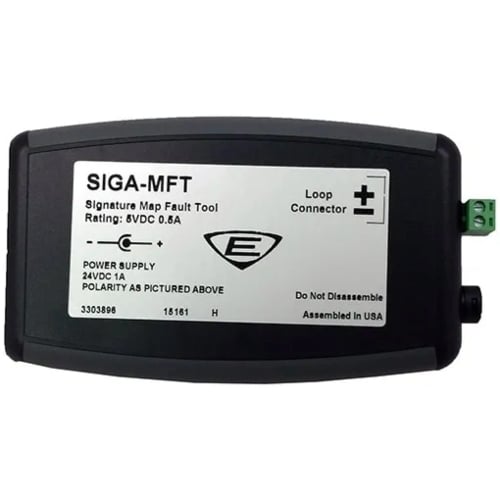
The Edwards SIGA-MFT Signature Map Fault Tool is a portable Signature Series diagnostic instrument. It helps technicians locate and resolve sources of mapping faults on a Signature signaling line circuit (SLC). Therefore, the SIGA-MFT speeds troubleshooting of intermittent mapping errors during commissioning and service.
Edwards SIGA-MFT — what it does
First, the tool connects to the Signature SLC loop via its loop-interface terminals. Then it communicates with the technician through a USB connection to a PC running the included diagnostic software. In addition, a green status LED on the front panel indicates power and operating state. As a result, the technician can isolate mapping discrepancies between the loop controller and field devices.
Power and connection
Operating voltage: 24 VDC. Current requirement: 500 mA. Furthermore, the SIGA-MFT can draw power from a USB host or from the included external power supply. Use the external supply when connecting through a USB hub without bus power or when SLC communication is lost on USB power alone.
What ships with the tool
The SIGA-MFT kit includes the diagnostic module, a USB cable, an external power supply, and PC software with operating instructions. Furthermore, the tool is intended for use by trained Edwards Signature Series technicians during commissioning, service, or mapping-fault investigation.
Physical
Shipping weight: 0.4 lb (0.18 kg). The tool is a Signature Series brand product from Edwards (formerly EST). Also, it is NOT a permanently installed loop device — it is a portable diagnostic tool, not a fire-alarm system component.
For more information, contact the Life Safety Consultants team at (888) 557-0558, or email us at: sales@lifesafetycom.com
Additional information
| Weight | 1.5 lbs |
|---|---|
| Dimensions | 12 × 5 × 4 in |
| Condition | New |
| Manufacturers | Edwards |
| Part Type | Input Module |